Replace Notion with Markdown — the escape guide
Most of what you do in Notion — docs, wikis, light databases — works as plain markdown files with Obsidian, git and friends. How to escape, step by step, and what you honestly trade.

Replacing Notion with Markdown
Still weighing it up? The feature-by-feature scorecard is at Notion vs Markdown; this page is the how, for when you've decided.
Let me be clear upfront: Notion is genuinely good software. The blocks editor is slick, the databases are clever, and teams get real value from it. If it's working for you and the trade-offs below don't bother you, carry on.
But Notion is also a proprietary blocks database that owns your notes, your wiki and your little databases, rented back to you monthly. Your "pages" aren't files; they're rows in someone else's system, reachable only through their app and their API. And most people don't realise that most of what they use Notion for works in plain markdown files. Not with heroic effort. With a nice editor and a couple of conventions.
The mapping
Take the things you actually do in Notion, one at a time:
Docs and notes. These are just markdown. Open Obsidian, point it at a folder, and you have a lovely editor over files you own: live preview, slash commands, the lot.
Wikis. Notion wikis are pages linked to pages. In markdown that's [[wiki-links]] between files, and Obsidian gives you backlinks and a graph view on top. (For team wikis with review and history, add GitHub – guide.)
Databases. The interesting one, and the reason people think they're stuck. A Notion database is records with fields and views. But a markdown file with frontmatter is a record with fields:
---
title: The Dispossessed
author: Ursula K. Le Guin
status: read
rating: 5
---
Anarchist moon physics. Loved it.
A folder of these is a table — here's one, three markdown files rendered as a live table in Obsidian:
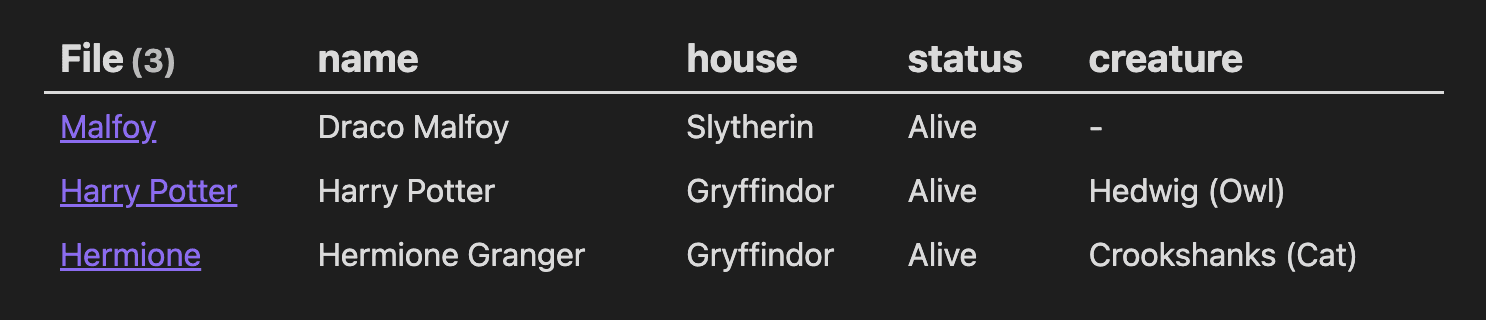
And Obsidian Bases now does natively what Notion databases do: table views, filters, sorting, cards, all over your plain files. (Dataview did it for years before that.) You can even publish a Base to the web. The full pattern, including when it's the wrong tool, is written up in The Markdown Database Pattern.
Sharing and publishing. Notion's public pages become: publish your folder (or part of it) with Flowershow or any static site tool. Your "workspace" gets a real website, on your domain.
Templates, daily notes, tasks. Obsidian has all of these, mostly built in, the rest a plugin away. Task lists are literally markdown (- [ ]).
What you give up, honestly
I'm not going to pretend it's a free lunch. Going markdown-based you lose:
- Real-time multiplayer editing. Git-based collaboration is asynchronous: commit, push, review. Fine (better, even) for docs and knowledge; wrong for six people live-editing one meeting note. Workarounds exist, but this is the genuine gap.
- Granular permissions. A repo is shared or it isn't. Page-level "only Sarah can see this" needs separate repos or published subsets.
- Heavy relational databases. Thousands of records, rollups, complex relations: at that point you want an actual database, not files. (Though ask yourself honestly whether you have that, or whether you have four lists and a books catalog.)
If those three are your core use, stay on Notion, sincerely. If, like most people, what you have is notes, docs, links and lists: you can own all of it.
The escape, step by step
- Export: Notion Settings → Export all workspace content → Markdown & CSV. You get a zip of markdown files and folders mirroring your workspace. (What survives and what doesn't: databases arrive as CSV plus per-row pages, toggles flatten, columns vanish.)
- Tidy: Notion appends ugly ID hashes to filenames; a rename pass fixes it (any AI tool will happily script this for you).
- Open in Obsidian: point it at the folder. That's it, you're operational. Fix broken internal links as you touch pages, not all at once.
- Add git when ready: push the vault to GitHub for history, sync and collaboration.
- Publish if you want: tutorial.
Notice what step 6 is: nothing. No subscription to start, no migration to schedule, because from here on your notes are just files. The next tool you fancy – a different editor, a different publisher, some AI agent that doesn't exist yet – will read them without asking anyone's permission.
That's the actual point. Not that Notion is bad, but that your content shouldn't need an export button.
